ZeRegLenstool · browser extension · open source · free
ZeRegLens: a sovereign reading assistant for EU regulatory texts
If your week includes DORA, MiCA, CRR, NIS2 or a CSSF circular, you know the drill: forty articles that point at each other, defined terms scattered across three chapters, and a search box that only finds exact strings. ZeRegLens is a browser extension I built for that kind of reading. It adds a side panel to the page you already have open and gives it structure: an outline, two-way cross-references, a glossary, optional AI summaries and a clean export.
It is sovereign by design. Everything runs inside your browser; in its default configuration the extension makes zero network requests, needs no account and carries no analytics. The code is open source under the MIT licence.
Today the extension installs from the GitHub repository in a few minutes (Chrome, Edge, Firefox). Steps below.
Chrome Web Store listing in preparation: the button will point to it as soon as it is live.
Everything on this page was read in the public repository on 23 September 2026.
Why this extension exists
Regulatory texts are read in a browser, on EUR-Lex or the regulator's site, as one long page. The structure that a legal database would give you is missing: no outline, no way to see which articles cite the one you are reading, no definition at hand for the defined terms, and a search that only matches exact strings. Reading Article 30 of DORA properly means scrolling to Article 28, then to Article 3(21), then back.
The usual workaround is worse: paste the article into a chat assistant and ask for a summary. That sends the text of what you are working on, and often the context around it, to a server you do not control. For a compliance or legal team that is not an acceptable default.
ZeRegLens takes the opposite bet: give the page the structure of a legal database, and keep every byte on the reader's machine. The parsing, the cross-reference graph, the glossary and, on Chrome and Edge, the AI summaries all run locally. If you want a remote model, you choose it, you name it, and you consent to it explicitly.
Who it is for
Anyone who has to answer the question what does this article actually require with the text open: compliance and risk officers, in-house and external counsel, internal audit, data protection officers, and the IT, security and operations people who implement DORA and NIS2 in practice. Consultants preparing a gap analysis and students of financial regulation will find the same shortcuts useful.
- You read regulations on EUR-Lex, the CSSF, the EBA, ENISA, the ABBL or the BIS at least once a week.
- You need the cited and citing articles without losing your place.
- You must not paste confidential reading into a cloud assistant.
- You want your notes and extracts in your own tools: spreadsheet, Markdown, JSON.
How to use it, step by step
Six steps, each illustrated with a real screenshot of the extension on a live regulatory page.
1. Install it and pin the icon
Install ZeRegLens from the store once the listing is live, or from the GitHub repository today (see the installation section below). Pin the ZR icon to your toolbar: the extension only wakes up on a supported site, and only when you click that icon. It has no access to your other tabs.
2. Open a regulation and click the icon: the outline appears
Open a text on one of the six supported platforms, for example Circulaire CSSF 24/856 on ICT risk management. Click the ZR icon: a side panel opens and reads the page. Titles, chapters, sections, articles and recitals become a clickable outline, and a marker follows the section you are reading. Click any heading to scroll the page there.
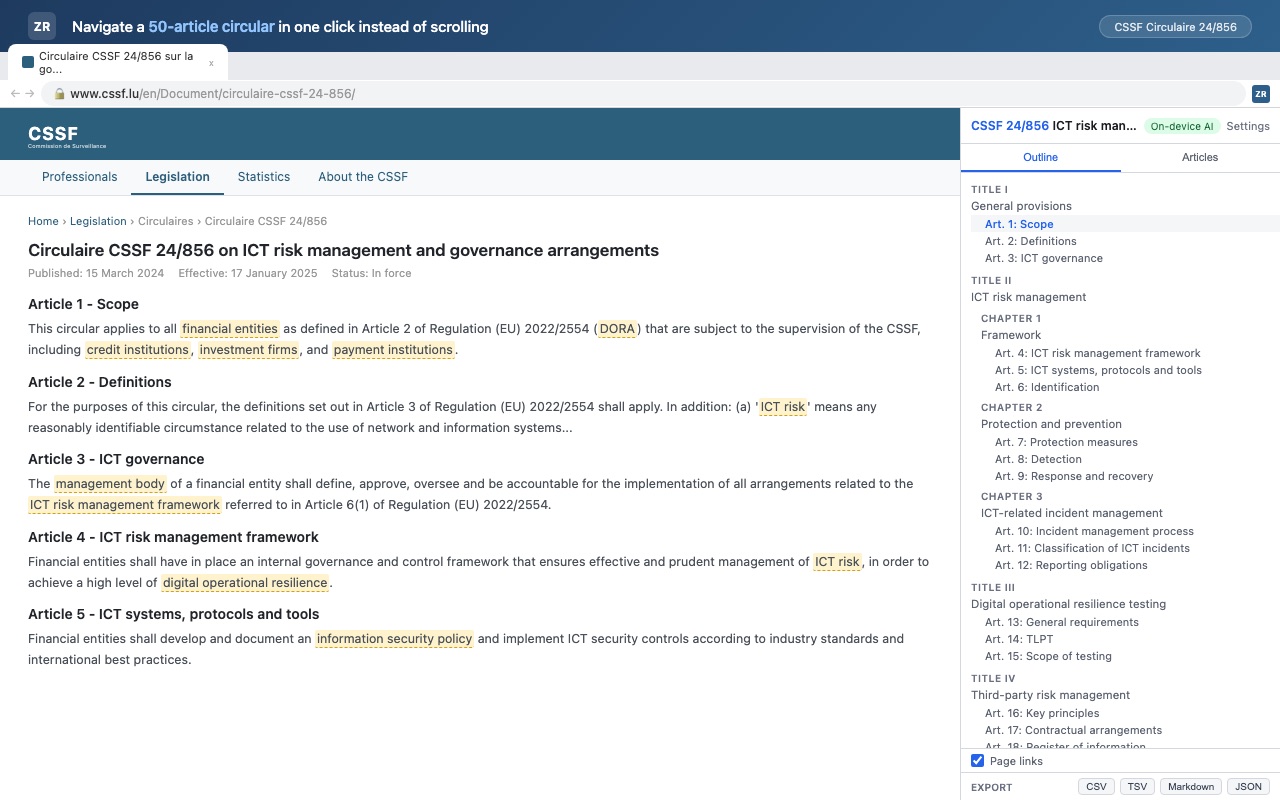
Circulaire CSSF 24/856 with the Outline tab: Title I General provisions, Title II ICT risk management, Article 1 to Article 18 3. Follow the cross-references in both directions
Switch to the Articles tab. For the article you are on, the panel lists what it cites and what cites it. On Article 6 of DORA (ICT risk management framework) that is 11 cross-references: it cites Articles 4, 5, 8 and 9, and it is cited by Articles 5, 7, 10, 11, 16, 25 and 28. In the page itself, references such as Article 6(4) or Article 9 become links, so the round trip is two clicks.
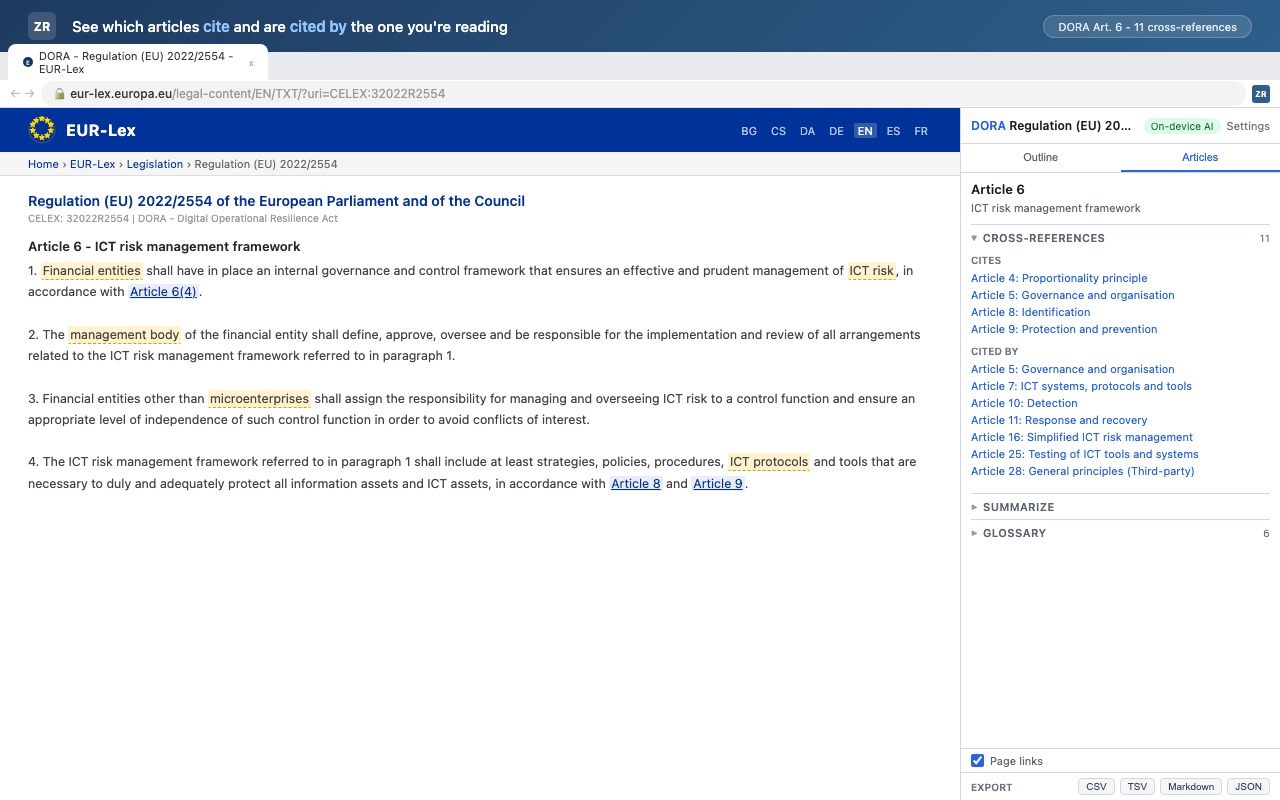
DORA, Article 6 on EUR-Lex: 11 cross-references, cites and cited by, with page links switched on 4. Hover a highlighted term for its legal definition
Every glossary term found in the article is highlighted in the page. Hover it, or open the Glossary section of the panel, to read the definition and its legal source: financial entity as defined in DORA Article 2(1), ICT risk in DORA Article 3(5), credit institution in CRR Article 4(1)(1), and so on. The glossary ships with 68 terms drawn from EU financial and cybersecurity acts, in English, French and German, and the panel shows how many times each term appears in the article.
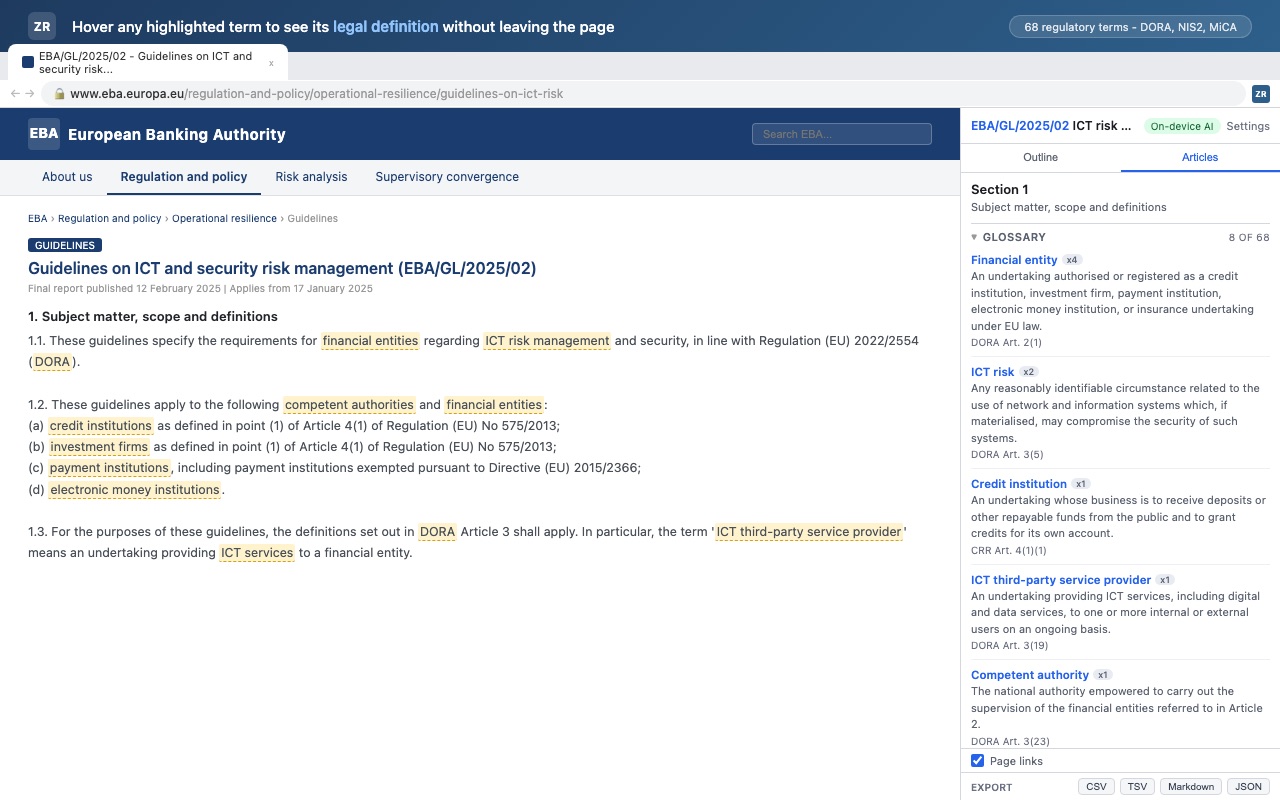
EBA/GL/2025/02, Section 1: 8 of the 68 glossary terms matched, each with its definition and source article 5. Ask for a plain-language summary, produced on your device
Open the Summarize section. On Chrome and Edge, the summary is generated by Chrome Built-in AI (Gemini Nano) on your computer: the panel says so under the result, and the text never leaves your browser. The panel also counts the modal verbs of the article, shall, should and may, and colours them in the page: on Article 5 of Circulaire CSSF 24/856, five binding shall, one should, one may. Binding obligations, recommendations and options carry different legal weight, and now you see them at a glance.
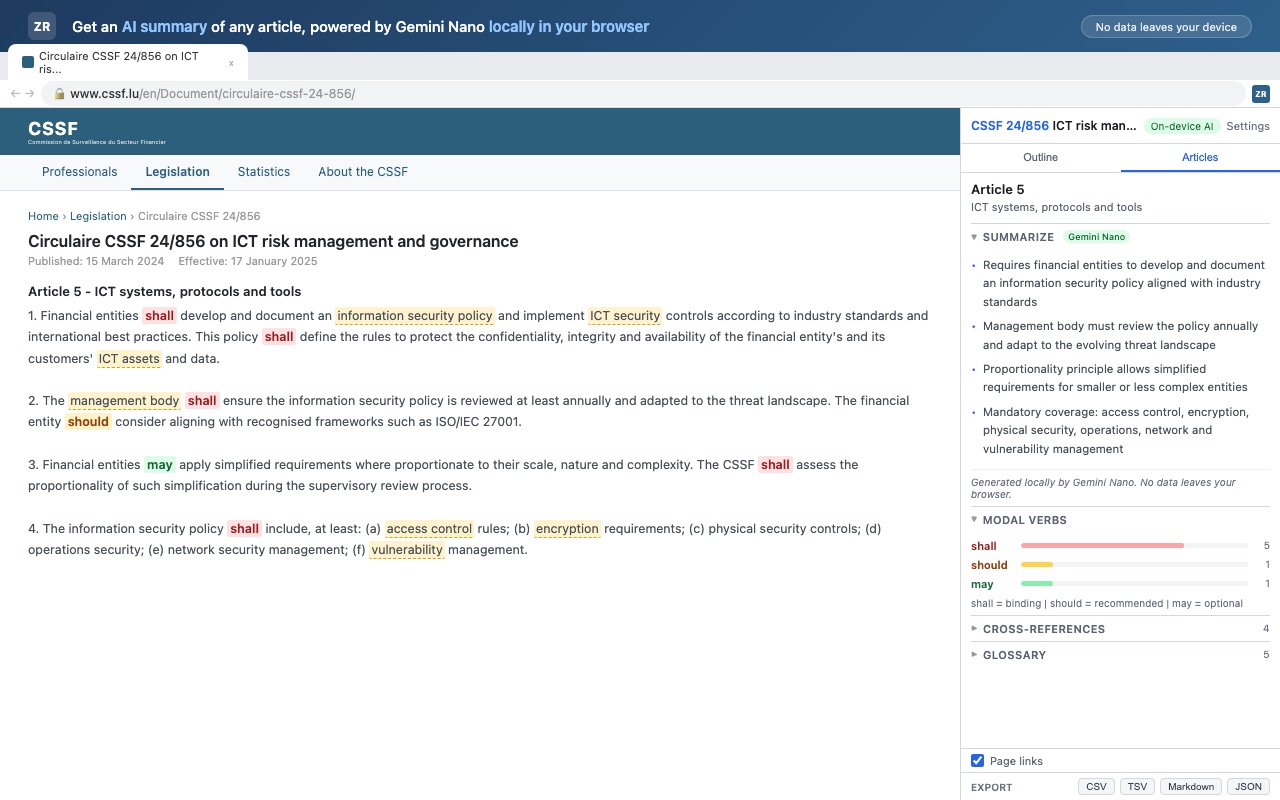
Article 5 of Circulaire CSSF 24/856: summary generated locally by Gemini Nano, modal verbs shall 5, should 1, may 1 6. Export the article for your memo
Open the export panel and choose CSV, TSV, Markdown or JSON. Tick whether to include the glossary terms, the cross-references and, if you generated one, the AI summary; then copy to the clipboard or download the file. Cell values are escaped so a spreadsheet will not execute a formula hidden in the text. The same panel restates the privacy design: all AI local, no analytics, open source, SHA-256 cache keys.
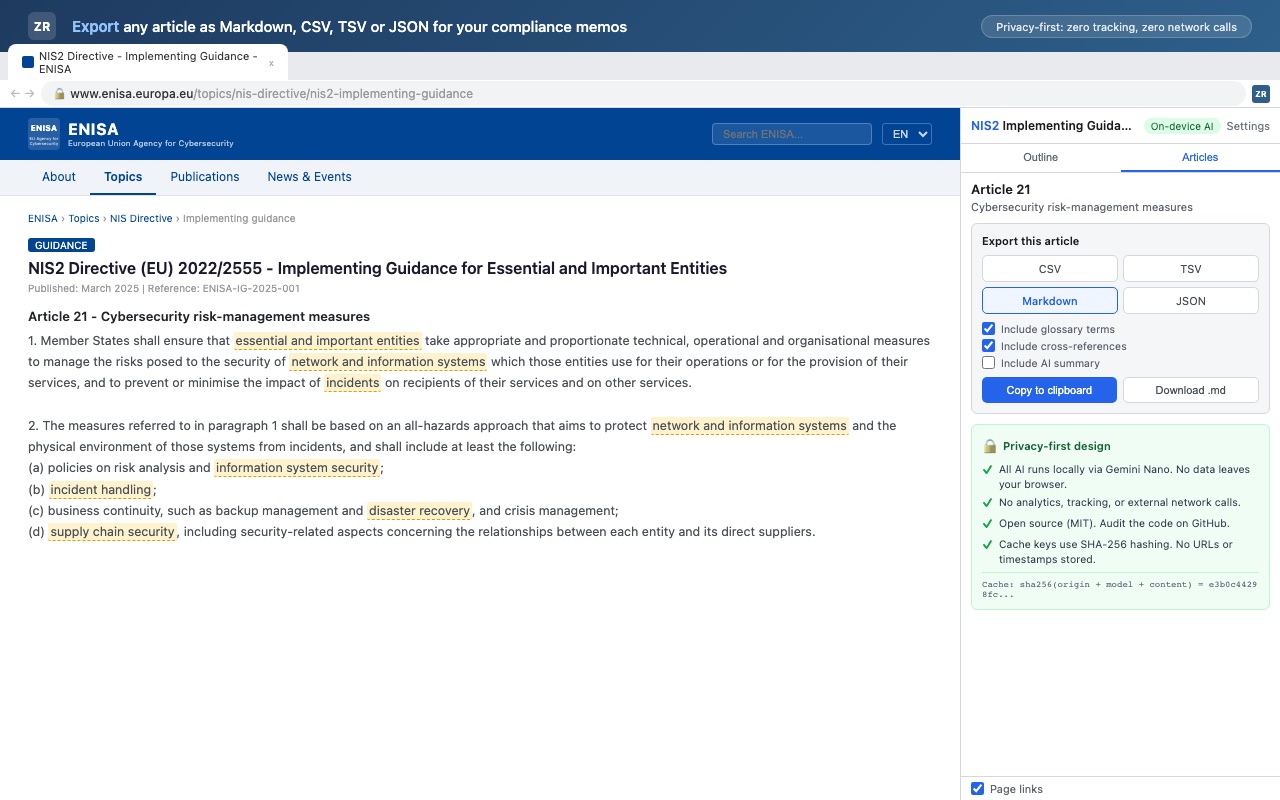
NIS2 implementing guidance on ENISA, Article 21: export as Markdown with glossary terms and cross-references, copy or download


AI summaries: three modes, your choice
By default, summaries are produced locally by Chrome Built-in AI (Gemini Nano): the text never leaves your computer and there is no API key to manage. If you prefer your own model, a remote mode lets you point the extension at an endpoint you control: an Ollama instance on your laptop, a Mistral deployment, or any OpenAI-compatible or Anthropic API. Remote mode is opt-in and asks for explicit consent on a screen that names the exact server and model; change either and the consent is reset. Only the article text is sent, never the URL, your history or your identity.
You can also switch AI off entirely: outline, references, glossary and export work without it. Summaries are cached locally under SHA-256 hashed keys, and the cache can be cleared at any time from the options page.
Privacy and permissions, line by line
The extension asks for three permissions: sidePanel to open the reading panel, storage for your settings and the summary cache, and scripting to inject the content script into a supported page when you click the icon. It does not request tabs, activeTab, webRequest, cookies, history or bookmarks, so it cannot see your other tabs or your traffic.
Host access is limited to the six regulatory platforms below. Nothing is written to the browser's sync storage: an API key must not travel through a vendor's cloud. On Firefox, the extension declares that it collects no data by default and that website content is sent only if you enable remote AI and consent to it.
Supported sites
One parser per platform; the content script is injected only on these domains, and only when you click the icon.
| Domain | What is parsed |
|---|---|
| eur-lex.europa.eu | Official Journal, consolidated texts |
| www.cssf.lu | CSSF circulars and regulations (EN and FR) |
| www.eba.europa.eu | EBA guidelines, regulatory products, Single Rulebook |
| www.enisa.europa.eu | ENISA publications and topic pages |
| www.abbl.lu | ABBL publications and articles |
| www.bis.org | BCBS publications, Basel Framework |
Install today: Chrome, Edge and Firefox
ZeRegLens ships as a Manifest V3 extension for Chrome 116+, Microsoft Edge, Firefox 142+. On Firefox the panel opens as a sidebar, and since Chrome Built-in AI does not exist there, summaries need a remote endpoint; everything else works the same.
Store submissions are being prepared. Until they are live, the extension installs from source in a few minutes, and the repository ships with more than 1,100 unit and build tests, strict TypeScript and a CI that builds all three targets.
git clone https://github.com/Sitraka17/ZeRegLens && cd ZeRegLensnpm cinpm run build (or build:edge, build:firefox)Load the unpacked build from .output/ in your browser's developer mode
Built at the same desk as the advisory work
I read these texts because observability and resilience work in Luxembourg's financial sector runs on them. If DORA or NIS2 is on your operations agenda, that is the conversation to have.
See how I work →DORA for US firms with Luxembourg operations · Read the note →
The EU Data Act and Data Governance Act explained for engineers · a public lecture, slides and notes →
FAQ
- Does ZeRegLens send my documents anywhere?
- No. By default the extension makes no network request at all: parsing, glossary matching and local AI summaries run in your browser. The only possible outbound call is the remote AI endpoint you configure yourself, and it starts only after you consent on a screen naming that server and model.
- Which websites does it work on?
- Six regulatory platforms: EUR-Lex, the CSSF, the EBA (including the Single Rulebook), ENISA, the ABBL and the BIS. Each has its own parser; the content script is injected only on those domains and only when you click the icon.
- Do I need Chrome's built-in AI?
- Only for local summaries. Outline, cross-references, glossary and export need no AI at all. Without Gemini Nano you can plug in your own endpoint or leave AI off.
- Is it free?
- Yes. ZeRegLens is open source under the MIT licence and the full source is on GitHub. No account, no subscription, no telemetry.
- Which browsers are supported?
- Chrome 116+, Microsoft Edge, Firefox 142+, all as Manifest V3. On Firefox the panel is a sidebar and AI summaries require a remote endpoint.
- Is it on the Chrome Web Store?
- Not yet: the store listings for the Chrome Web Store, Edge Add-ons and Firefox Add-ons are in preparation. Until then, install from source: clone the repository, run npm ci and npm run build, then load the unpacked build from the .output folder in developer mode.
- Does it interpret the regulation for me?
- No. It gives you the structure, the references, the definitions and, if you ask, a plain-language summary that is clearly labelled as generated. The interpretation stays with your compliance and legal teams.
Sources
Everything above is read in the public repository and its screenshots, not summarised from memory. Checked 23 September 2026.
- README · what it does, supported sites, AI modes, install from source
- docs/PRIVACY.md · privacy policy, EN and FR
- docs/PERMISSIONS.md · every permission and host, with its justification
- CHANGELOG.md · 0.1.0 release notes, 18 September 2026
- data/glossary.json · the 68 glossary entries, with their legal sources
- LICENSE · MIT
ZeRegLens helps you read; it does not interpret. Your compliance and legal teams own the interpretation, and nothing here is legal advice.